
Tired of Chasing Updates? The Best Automated Status Reporting Tool for Every Team
Every Friday, the same scene repeats. A project manager chases five people for updates. A PMO waits for slides that arrive late. An executive opens a deck that's already outdated. This cycle wastes hours every single week. It also breeds frustration across the whole team. The good news is this problem has a fix. That fix is an automated status reporting tool.
Why Manual Status Updates Drain Your Team
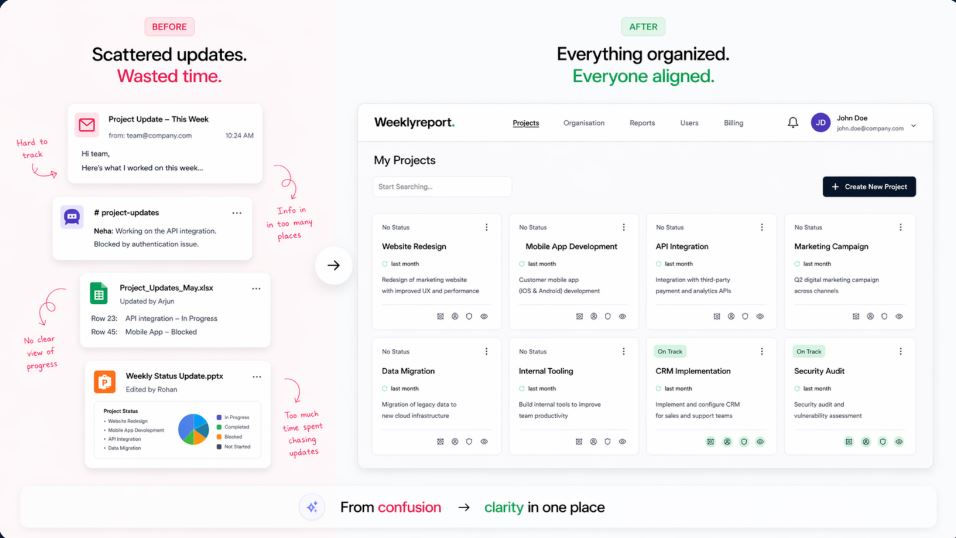
Manual reporting feels simple at first. You open a document. You type an update. You send it around for review. But this process breaks down fast at scale. Ten projects become forty projects overnight. Suddenly, one person is consolidating thirty different decks. Formats don't match. Data goes stale before the meeting starts. Nobody knows which version is the real one.
This is where a true automated status reporting tool changes the game. Instead of rebuilding a report from scratch, structured updates carry forward automatically. Teams only update what has actually changed. That single shift saves real hours every week.
The Real Cost of Chasing Updates Every Week
Chasing updates isn't just annoying. It has a real, measurable cost. PMOs spend entire weeks reminding people to submit slides. Reminders go out. Slides trickle in late. Someone still has to consolidate everything by hand. The meeting ends up discussing formatting instead of real progress.
There's also a trust problem hiding underneath. A project manager controls their own traffic light. A project running late can still show green. If the narrative sounds confident, nobody questions it. That's not governance. That's just performance.
Then there's the paper trail, or the lack of one. Slides get forwarded through email chains. Attachments can't be recalled later. When something goes wrong, nobody proves what was known, or when. A proper automated status reporting tool solves this with a permanent, timestamped audit trail.
What Makes an Automated Status Reporting Tool Different
Not every reporting platform actually automates anything. Some just digitize the same manual process. A genuine automated status reporting tool removes the translation step entirely. It becomes the single source of truth for reporting itself.
Here's what separates the real thing from the rest:
● Structured Updates that Carry Forward
Instead of a blank page every week, the past report becomes the current starting point. You update only what changed, not the whole narrative.
● One Live Page Per Project
No more scattered files across inboxes and drives. Everyone views the same permanent, role-controlled page.
● Automatic Portfolio Rollup
Executive and portfolio views build themselves from project-level updates. There's no manual consolidation step required.
● A Complete Audit Trail
Every entry gets timestamped and attributed automatically. Nobody can dispute what was reported, or when.
● Role-based Access Control
Executives, PMOs, and delivery teams each see the right level of detail. Access can be revoked centrally at any time.
Inside weeklyreport.io: A Purpose-Built Automated Status Reporting Tool
weeklyreport.io was built specifically to solve this exact problem. It positions itself as an automated status reporting tool for weekly project governance. Rather than helping teams execute work, it helps organizations report that work consistently.
The comparison is straightforward. Delivery tools like Jira or Asana manage tasks and sprints well. But weekly reporting inside them often becomes a manual afterthought. Someone still has to export and summarize. Additionally, rewrite everything for stakeholders. Documents and slide decks are flexible. At the same time, they're also labor-intensive. Version drift and inconsistent formatting slow everything down at scale.
weeklyreport.io approaches this differently. It offers structured weekly updates instead of blank documents. Last week's report carries forward as your starting point. There's one live project page instead of scattered files. Executive and PMO governance views come built in. Portfolio rollup happens automatically, without extra consolidation work. Each update gets logged in a full audit trail.
Key Features to Look For
If you're evaluating any automated status reporting tool, consider the following:
● Carry-forward Structure
This is the biggest time-saver. Instead of rewriting a status narrative from zero, you edit what actually changed. This alone can save hours across an entire reporting cycle.
● Consistent Templates Across Projects
When every team reports using the same structure, comparison becomes effortless. Leadership doesn't need to reinterpret ten different formats.
● Live, Role-based Views
Executives shouldn't need a separate slide pack built just for them. A proper reporting tool surfaces the right view automatically, based on role.
● Governance-grade Security
Look for encryption at rest and in transit. Data residency options matter for regulated industries too. Sensitive project data shouldn't travel through forwarded email chains.
● No Downloadable Slide Files
This might sound small, but it matters. Once a deck leaves someone's desktop, control over that data is gone. A live URL, by contrast, can be revoked instantly.
How an Automated Status Reporting Tool Works in Practice
Good tools follow a simple, repeatable structure. weeklyreport.io breaks its process into four clear stages.
● Set up
Each project gets one permanent, role-controlled page. The PMO configures reporting fields, cadence, and stakeholder access upfront. There's nothing to install and no template to distribute.
● Update
Project managers open their page and fill out a structured form. Last week's activities, risks, and actions carry forward automatically. You only update what has genuinely changed since last time.
● Contextualize
PMs still provide plain-language narrative around cause and impact. This context gets attributed, timestamped, and preserved permanently. Nothing important gets lost in an old email thread.
● Govern
Leadership sees a live picture built from the same structured data. Executives, programme leads, and delivery teams each get appropriate detail. There's no separate slide deck required for each audience.
Who Benefits Most from This Approach
Almost every team dealing with recurring updates benefits from automation. But a few roles see the biggest impact immediately.
PMOs stop chasing project managers for slides every single week. Instead, they monitor a live dashboard for completeness and risk. Reporting capacity shifts from collection work to actual governance.
Project managers reclaim real hours previously spent formatting decks. They update a structured form rather than rebuilding a presentation. Their narrative and context still get captured and preserved properly.
Executives get a decision-ready view without waiting for a consolidated pack. Status, risks, and required decisions surface automatically from live data. Nothing is stale by the time a meeting starts.
Governance and compliance teams gain something PowerPoint simply cannot offer. Every update is permanently recorded, timestamped, and attributed correctly. That audit trail becomes essential during regulated reviews or disputes.
Making the Switch
Switching to an automated status reporting tool doesn't mean abandoning your delivery tools. Jira, Asana, and similar platforms still manage day-to-day execution well. What changes is how that work gets translated into a report. Instead of a manual weekly rebuild, reporting becomes structured and automatic.
The result is faster reporting, fewer inconsistencies, and better audit readiness. Teams spend less time formatting and more time delivering actual work. Executives finally see a picture that's accurate and current. That's the real promise of automation done properly.
Conclusion
Chasing status updates every week isn't a sustainable process. It wastes time, damages trust, and hides real risk behind confident narratives. A genuine automated status reporting tool removes that translation step entirely. Structured updates, live portfolio views, and full audit trails replace manual chaos. Whether you manage one project or forty, this shift saves real hours. It also gives leadership a picture they can actually trust.
FAQ’s
1. What exactly is an automated status reporting tool?
It's a platform that turns raw project updates into structured, consistent reports automatically. Instead of manually rebuilding a document each week, updates carry forward and change only where needed.
2. How is this different from regular project management software?
Project management tools like Jira handle tasks, sprints, and backlogs well. An automated status reporting tool focuses specifically on turning that work into clear, reportable status for stakeholders.
3. Does automation remove the project manager's input from reporting?
No, it structures that input instead of replacing it. PMs still provide narrative, context, and explanation. The tool just removes the formatting and consolidation overhead around it.
4. Can automated reporting tools scale across large portfolios?
Yes, that's actually where they help the most. Portfolio and executive views roll up automatically from individual project updates. There's no manual consolidation step required, even across dozens of projects.
5. Is switching to an automated status reporting tool difficult?
Most platforms are designed for quick setup, without needing separate software installs. You typically keep your existing delivery tools and simply change how reporting gets structured.
Comments